Welcome to NikTricks

The World of Tips and Tricks

Showing posts with label Internet Tips and Tricks. Show all posts

June 06, 2012

How to use Free Aircel 3G Speed on 2G?


First of all u need a Aircel 2G sim and activated any 2G plan. After activation of plan insert the SIm card in 3G enabled Handset. The actual tricks is Now Send a message
type START 3G and send it on 121. wait for some time. you will get a confirmation message .
njoy 3G net on 2G

Note:- Always use this tricks on low balance.
-
 Niktricks.blogspot.com

June 02, 2012

HOW TO INCREASE MODEM TIMEOUT?


Increasing the Modem Timeout If your modem it is timing out during file transfers or loading Web Pages, you might try increasing the timeout period.

                                                          
 To change the Time Out::
1.Open RegEdit
2.Go to HKEY_LOCAL_MACHINE\System\CurrentControlSet\ Services\ Class\ Modem\ XXXX\

June 01, 2012

How to add a "Email me" link on your blog?


How to add a "Email me" link on your blog?

Adding the "Email me" link to your blog/webpage is very helpful for the visitors who want to contact you.It increases the interactivity between the visitors and your site and make them come regularly.

There are plenty of problems if you show your email address directly on your site as SPAMMERS find your email address easily via search engines,and other sources.
So,by adding this type of links will hide your email address and If your visitors want to contact you,they will click on it.If the visior want to sent to you via another source like yahoo,google,etc they will simply copy the email address(in the outlook express) and email you.
On clicking the links,WINDOWS OUTLOOK EXPRESS will be open by default.
                                                   
                                            Email me
So,how to add the "Email me" link?
There are two types of ways to do it.One is text link and another one is image link.

May 19, 2012

How to add Facebook Like button Below each post on Blogger?

Adding Facebook Like Button To Blogger


Follow the following steps:-

  1. Go To Blogger > Design > Edit HTML
  2. Backup your template
  3. Click the "Expand Widgets Templates" Box
  4. Search for this,press ctrl + f buttons to search
                                               <data:post.body/>
  
    5.    Just above it paste the code below,

<iframe allowTransparency='true' expr:src='&quot;http://www.facebook.com/plugins/like.php?href=&quot; + data:post.url + &quot;&amp;layout=button_count&amp;show_faces=false&amp;width=100&amp; action=like&amp;font=arial&amp;colorscheme=light&quot;' frameborder='0' scrolling='no' style='border:none; overflow:hidden; width:100px; height:20px;'/>

     6.   Save your template and you are done!
   
     Reload your blog and check changes!!
-
Niktricks.blogspot.com

March 24, 2012

How to Access Google documents without internet connection?


How to Access Google documents without internet connection?

It  is a normal thing to save notepad,word, excel or powerpoint files in Google docs. Whenever internet is available these files can be accessed by doing login to Google docs panel.But what you do when you have no internet connection?Or your internet stopped working due to some network problems.In that case you are not able to read these files.To resolve this problem Google provides a  service known as takeout.With the help of this service  you can save your all Google docs files in one Zip file This can be done by  just clicking on one button.After this you can save these files in  whatever extension  you want.A Simple process is given below by which you can do it.


Export Google Docs
1.For this first of all go to the link given below:

2.After this you have to login to your Gmail account.

3.Now choose Google docs service and than click on create 
archive button.

4.In this way it will save your Google docs files in one zip file.

5.If you want than you can save your file in popular extensions
Like excel,word or powerpoint or you can make  pdf also.

6.Instead of this,these files can be opened in open office service.  

-
Niktricks.blogspot.com

March 08, 2012

How to Download Torrent via IDM?

Download Torrent Using IDM or Any Download Manager.

Read this Full Tutorial and By using this Method You can Download Your Torrents Using Your Any download Manager Like IDM,FDM OR more


Step1:

First You Will Need To Download any .Torrent file
For Eg: In my case I want to Download Windows 7 DVD torrent by using idm
First I will Search my files on Torrentz.com 
This is My file 

Note:


Before downloading any files
just check the maximum seeders on your files

Or
You can Use Simple HASH INFO Hex Of that Torrent to add in this Address from any torrent sites like 13
(if u use this method then skip step 2)


So main Address is

Screenshot: (Download torrent or info hash1337x.org)


Step 2:


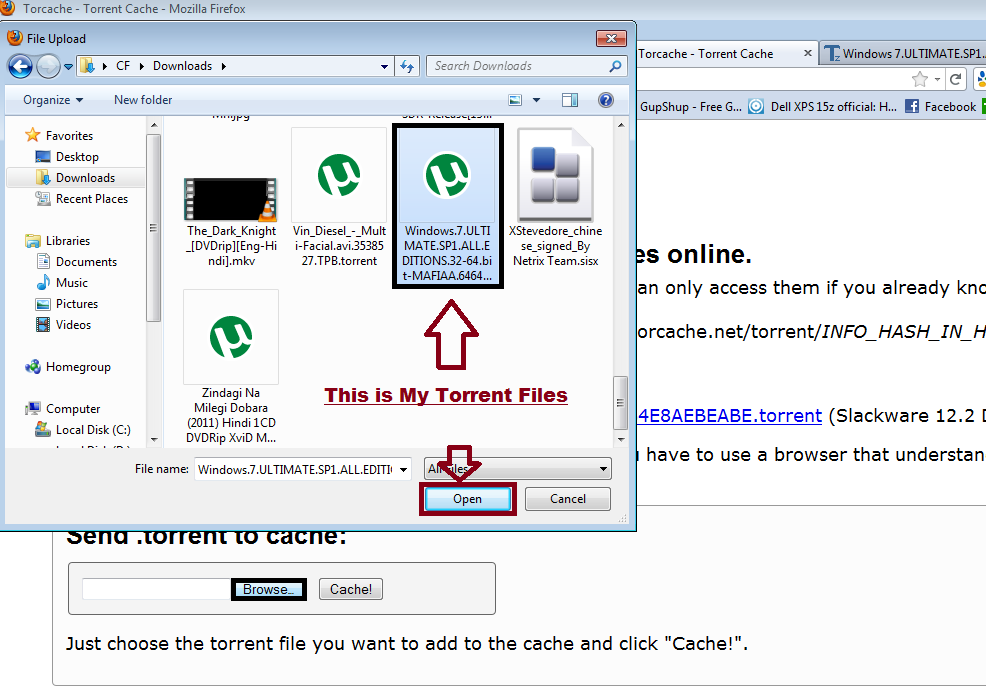
Now Open Torcache.net
  • Now See Screenshot
  • Now Click on Browse
  • After that Search Your torrent file of that desired Torrents.
  • After Finding That Torrent Now Click on it open

  • Now CLick on CACHE
After it Your Torrent File Is cache Successfully

This is My cache torrent files
http://torcache.net/torrent/2B946E66BF1440109B6BB2C242049752B04634B3.torrent


STEP 3:


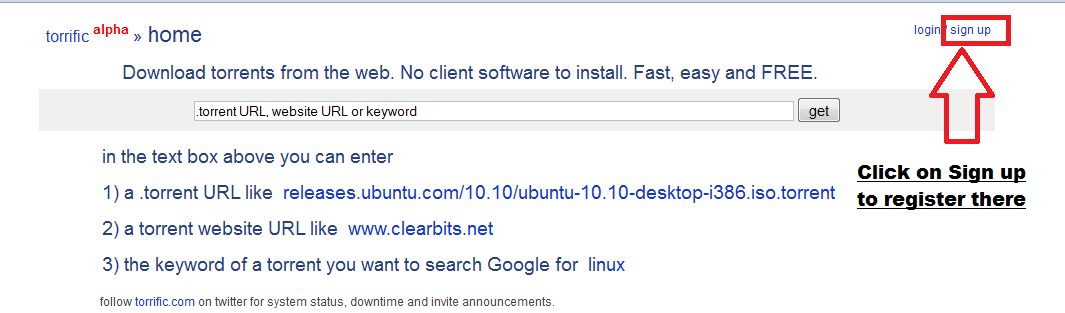
NOW goto http://torrific.com/


  • First Sign Up There
  • After Login To Your Account
  • You Will get One Following

  • Now Add your Step2 Cache Address here in that Box
  • Now click on GET
Step4 :

Now click on Initiate Bit-torrent transmission
if Your Torrent Has more seeder then your file is cache n available for download rapidly
  • Then You can Download Your Torrent Directly via IDM


If not Then You Will see or wait until the process of transmission takes place from queue to ready


Thanks For Visiting
If you have any Problem Then Us We will Give You Solution


Short Procedure:
Download Torrent Using IDM
  • 1. Download any torrent File
  • 2. Goto Torcache.net
  • click on Browse
  • 3. Now open ur .torrent file
  • Click on Cache
  • 4. now Goto Torrific.com
  • 5.Sing up there
    6.Now paste ur cache torrent to that box now hit GET
  • 7.now click on initiate bit torrent transmission
  • 8. Ready to download


Source :- Computerfunz.blogspot.com
-
Niktricks.blogspot.com

INTERNET ERROR CODES


INTERNET ERROR CODES:
  • Error 400 - Bad request.
  • Error 401 - unauthorized request.
  • Error 403 - forbidden.
  • Error 404 - Not found.
  • Error 500 -Internal error.
  • Error 501 - Not Implemented
  • Error 502 - Bad Gateway
  • Error 503 -Service unavailable.
  • Error 504 - Gateway Time-Out
  • Error 505 - HTTP Version not supported/DNS Lookup Fail/unknw host
  • Error 500-599 - Server Errors.
    There is a problem at the server end stopping the request from completing successful
-
Niktricks.blogspot.com
Related Posts Plugin for WordPress, Blogger...

Blogroll